Automating PostgreSQL Database Migrations with Yuniql and GitHub Actions
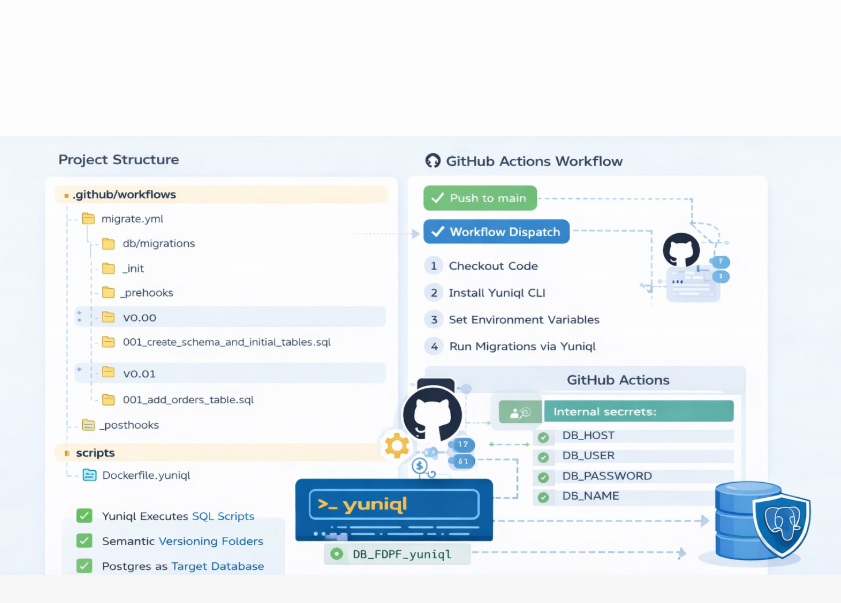
Automated PostgreSQL Migrations with Yuniql and GitHub Actions
Managing database schema changes can be one of the most challenging aspects of software delivery, especially when working with incremental updates across teams and environments.
In this post, I walk through a real example — a publicly available repository that automates PostgreSQL database migrations using Yuniql with GitHub Actions.
This solution applies native SQL migrations as part of a CI/CD pipeline in a production-ready way.
🧠 What Is Yuniql?
Yuniql is a migration-based database versioning tool that runs plain SQL scripts (no ORM) and keeps track of applied versions.
It acts like DevOps automation for databases: versioning, sequencing, and applying migrations in a consistent order. :contentReference[oaicite:0]{index=0}
📂 Project Structure (from the repo)
The repository shows a clear layout for managing migrations and CI/CD:
.github/workflows/
  └── migrate.yml          # GitHub Actions workflow
db/migrations/
  ├── _init/               # Setup scripts (run once)
  ├── _pre/                # Pre-version hooks
  ├── _post/               # Post-version hooks
  ├── v0.00/               # Version 0.00: base schema
  ├── v0.01/               # Version 0.01: new tables
  └── v0.02/               # Version 0.02: updates
scripts/
  ├── run-local.sh         # Local runner
  └── run-local.ps1
docker/
  └── Dockerfile.yuniql
This structure makes migrations:
- Modular
- Incremental
- Easily runnable locally or in CI/CD
🚀 Quick Start
Locally
- Clone the repo:
git clone https://github.com/vishaljudoka/yuniql-postgres-github-actions - Start PostgreSQL:
docker run -d --name postgres \ -e POSTGRES_USER=postgres \ -e POSTGRES_PASSWORD=postgres \ -e POSTGRES_DB=sample_db \ -p 5432:5432 \ postgres:latest - Setup environment:
cp scripts/.env.example scripts/.env - Run migrations:
./scripts/run-local.sh
🛠 CI/CD with GitHub Actions
The migrate.yml workflow does the following:
- Runs on push to main or manually via workflow dispatch
- Checks out code
- Installs Yuniql CLI
- Runs migrations using environment variables stored as GitHub Secrets
Required repo secrets:
DB_HOST
DB_USER
DB_PASSWORD
DB_NAME
GitHub Actions ensures every push triggers database migration automation.
🧩 Migration Best Practices (Used in This Repo)
✔ Semantic versioning folders (v0.00, v0.01, etc.)
✔ Use IF NOT EXISTS in SQL for idempotent behavior
✔ Separate pre and post scripts for hooks
✔ Scripts only in version folders are executed in order — ensures safe deployment
Example naming convention:
v0.00/001_create_schema_and_initial_tables.sql
v0.01/001_add_orders_tables.sql
🧪 Why This Matters
✔ Automates repetitive database work
✔ Makes changes version controlled
✔ CI/CD integration adds deployment confidence
✔ Works for local and cloud PostgreSQL environments
✨ Next Steps
You can extend this workflow by:
- Adding tests that run post-migration
- Supporting rollback scripts
- Integrating notification on migration failures
🧾 Summary
This project demonstrates a practical, automated approach to handling database migrations that fits well in modern DevOps pipelines. Using Yuniql with GitHub Actions enables reliable and repeatable updates every time you push code.
If you’d like, I can also tailor this content further for SEO or add screenshots from the workflow.